Battlefield 6 Arcane External
Price
Quantity
Min , max
Buy
more to get a
% discount.
Information
🎯 AIM – GENERAL
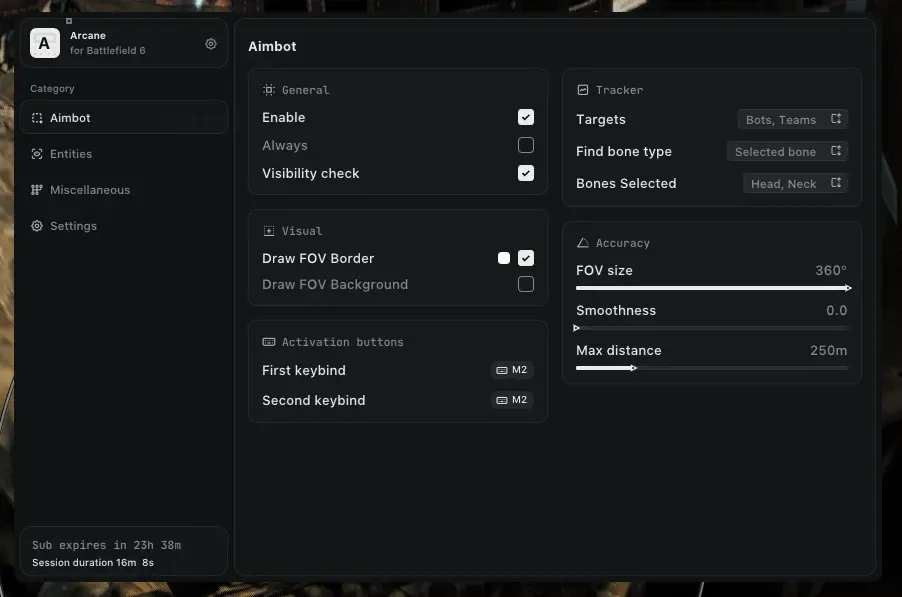
Comprehensive Aiming Tools For Ultimate Control & Precision
- Aim Type: Toggle between On Hold and Always Active modes
- Dual Keybind Support: Primary & secondary activation keys
- Visibility Check: Ensure targets are visible before engaging
- FOV Visualization: Draw FOV border with background fill
- Custom FOV Radius: Adjustable targeting area (0°-360°)
- Smoothness Control: Precision aim smoothing (0-100%)
- Max Distance: Set maximum engagement range
🎯 AIM – TARGET
Advanced Target Selection & Prioritization
- Target Filters: Players, BOTs, Teammates selection
- Bone Detection: Selected, Closest, or Random bone patterns
- Bone Priority: Head, Neck, Body, Pelvis targeting options
🎯 AIM – CROSSHAIR
Custom Reticle Configuration
- Crosshair System: Fully customizable aiming reticle
👁️ ESP – GENERAL
Advanced Visual Intelligence System
- Bounding Box: Box or Corner style enemy highlights
- Fill Options: Static colors or dynamic gradient fills
- Health Bars: Static, Health-based, or Gradient displays
- Skeleton ESP: Adjustable bone thickness (1-10px)
- Identity Tags: Name and Distance indicators
- Tracking Lines: Direct and View-direction lines
- Visible/Non-Visible Colors: Toggle between color sets for visible and hidden targets
- Team Management: Toggle BOTs and Teammates visibility
- BOT Transparency: Adjust AI visibility intensity
- Max Render Distance: Control ESP display range
⚙️ SETTINGS
Performance & Display Controls
- FPS Overlay: Real-time performance monitoring
- Overlay FPS: Customize overlay refresh rate (30-240 FPS)
💾 CONFIGS
Complete Profile Management
- Add: Create new configuration profiles
- Rename: Customize existing profile names
- Load: Instantly apply saved settings
- Share: Export configs to other users
- Delete: Remove unwanted profiles